Skip to content
ManySetter

Where are my Instagram messages?

In the app, tap Messages at the bottom. Chats from people you don’t follow wait in Requests until you accept them, per Instagram Help (opens in a new tab).

Free, no login, nothing to install. Every path comes from Instagram Help, checked November 1, 2026.

The fix for each situation

Where to tap, why it happens and what to do, from Instagram’s own help pages.

9 situations

Can’t find a DM in your chats?

Your chats are under Messages, at the bottom of the app. If one isn’t in the list, Instagram documents three other places to check.
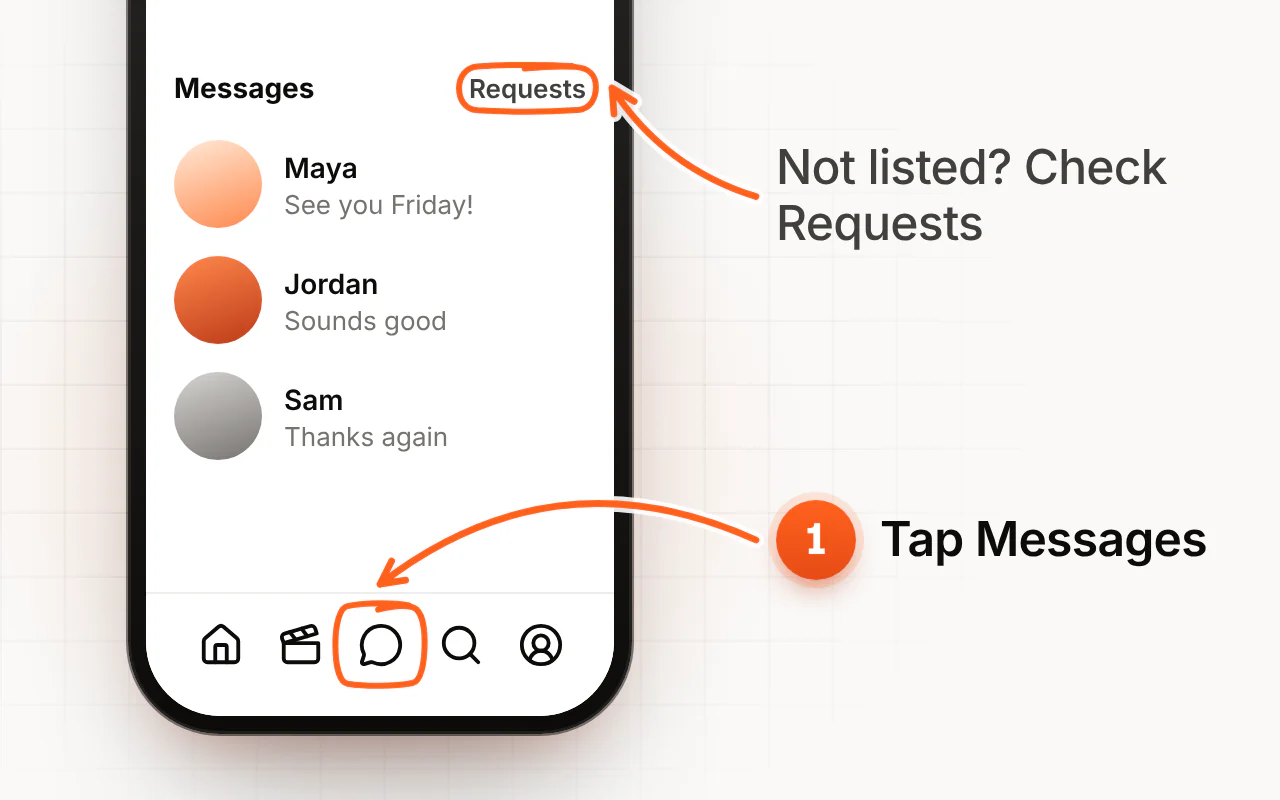
Phone inbox with the Messages tab circled in the bottom bar, and Requests circled above the chat list.
Tap Messages at the bottom. A chat that isn’t listed may be in Requests.

Where to tap

iPhone and Android

Messages

Computer

Messages

Why it happens

Only accepted chats reach your Chats list. Requests, Spam and locked chats sit outside it, and so do people you restrict.

What to do

  1. Open Requests: chats from people you don’t follow wait there.
  2. Check Spam, inside Requests: it sends no notifications.
  3. Swipe down from the top of your inbox to open Locked chats.
  4. Restricted someone? Your chat with them moved to Message Requests.
Sources (5)Checked

How do you check message requests on Instagram?

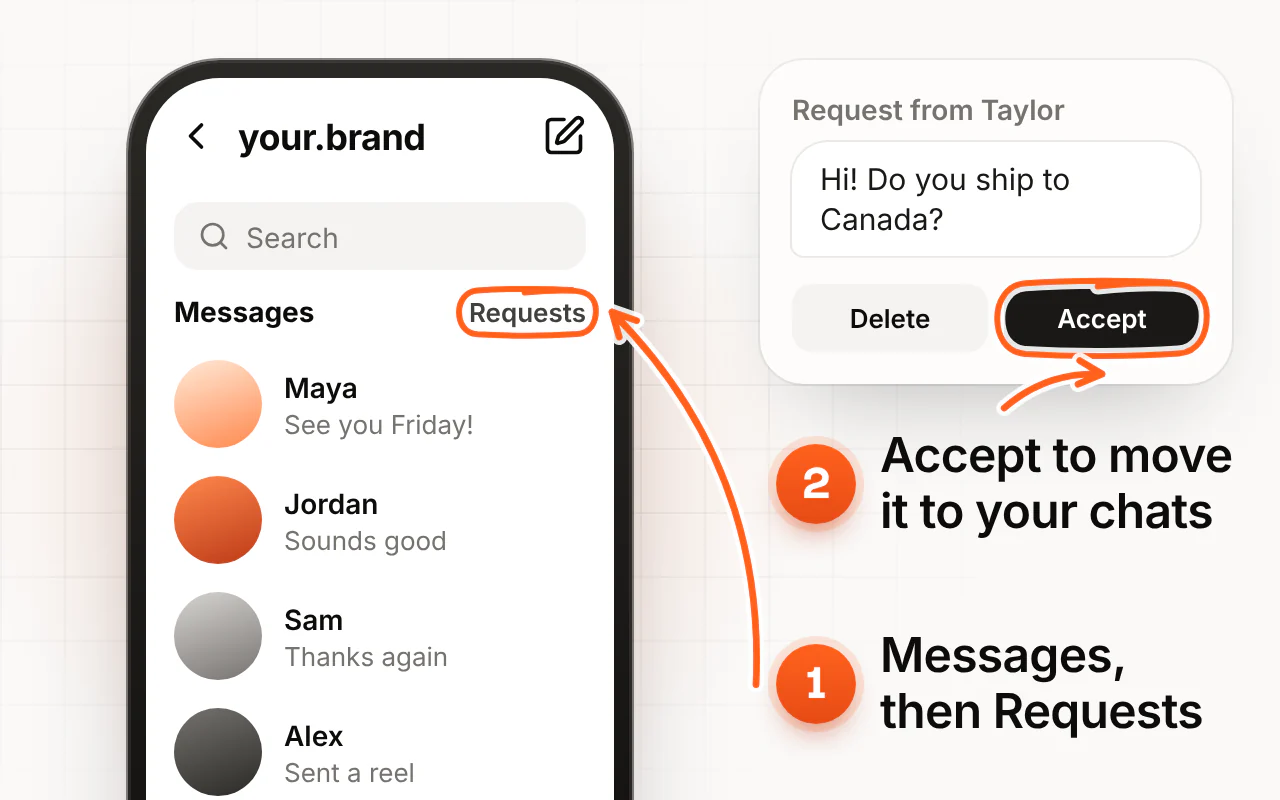
Tap Messages at the bottom, then Requests. Messages from people you don’t follow wait there until you accept them.

Inbox with Requests circled above the chat list, next to an open request from Taylor with its Accept button circled.
Tap Messages, then Requests. Accept a request to move it into your chats.

Where to tap

iPhone and Android

MessagesRequests

Computer

MessagesRequests

Why it happens

Instagram keeps chats from people you don’t follow out of your Chats list until you accept them.

What to do

  1. Open a request to read it, then accept it to move the chat into your Chats list.
  2. Until you accept, the sender can only send text: no photos, videos or voice notes.
  3. Hidden ones are in Spam, inside Requests.
  4. Getting none at all? Check Menu, then Messages and story replies, then Message requests.
Sources (4)Checked

Where are hidden message requests?

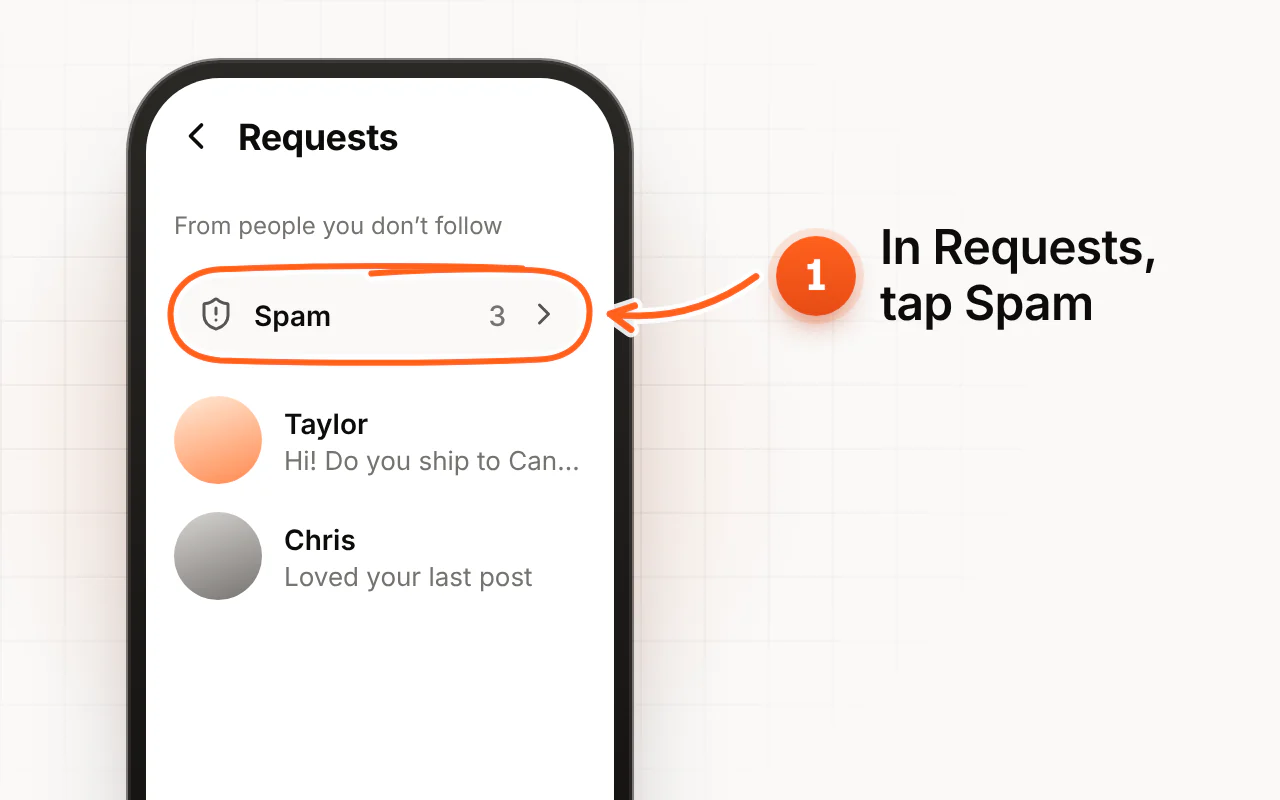
Instagram files them in Spam: tap Messages, then Requests in the top right, then Spam.

Requests screen with the Spam row circled, above two message requests from people you don’t follow.
In Requests, tap Spam: hidden requests wait there, without notifications.

Where to tap

iPhone and Android

MessagesRequestsSpam

Computer

MessagesRequestsSpam

Why it happens

Requests that may be offensive, spam or caught by your Hidden Words go there, and Spam sends no notifications.

What to do

  1. Open one and tap Accept: the chat moves to your main messages.
  2. Delete all, at the bottom, clears the folder. On iPhone, tap Edit first.
  3. Real messages there? Turn off Hide unwanted message requests (Menu, Messages and story replies, Message requests) to restore them.
  4. Accounts you’re already connected with are never hidden.
Sources (2)Checked

Instagram says you have a message, but you don’t?

We found no Instagram Help article on stray message alerts. It does document where a message can sit outside your Chats list: check those.

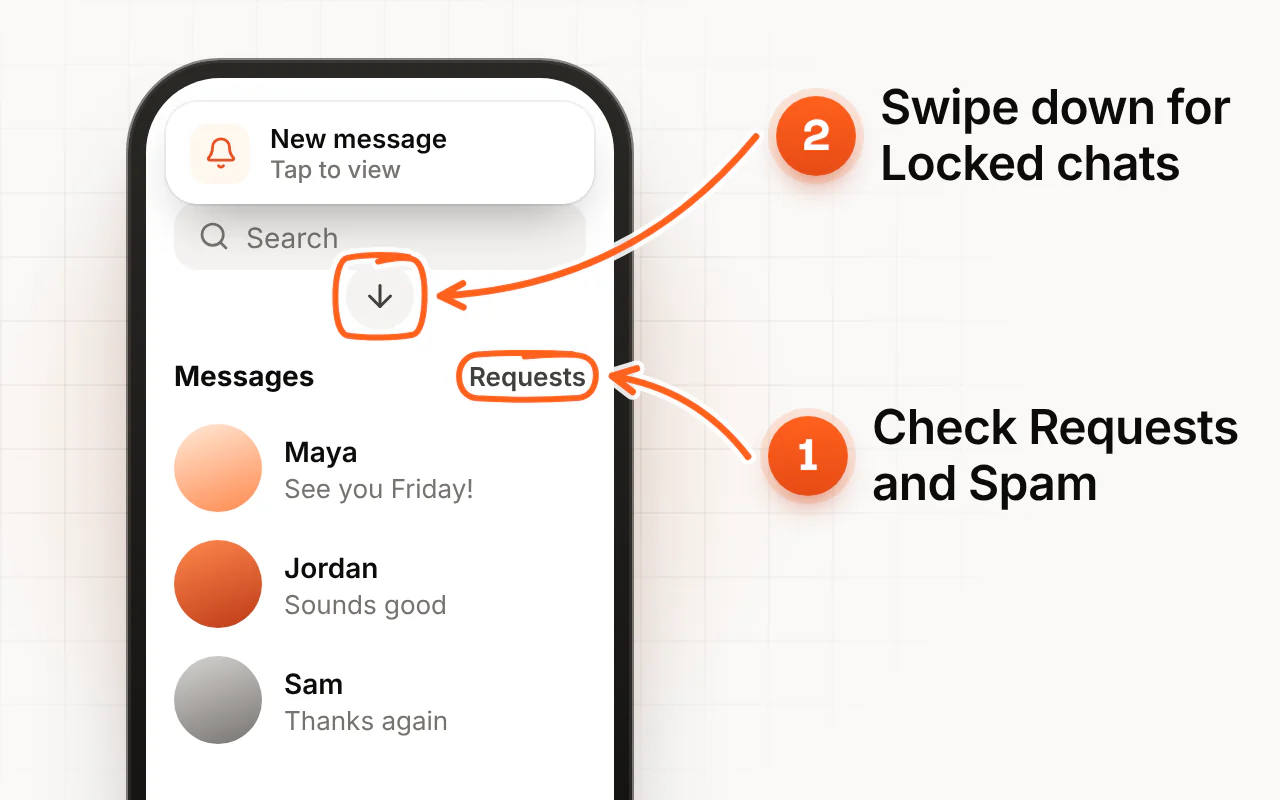
Inbox under a New message alert, with Requests circled and a swipe-down arrow circled above the chat list.
Check Requests and Spam, then swipe down in your inbox for Locked chats.

Where to tap

Requests and Spam

MessagesRequestsSpam

Locked chats

MessagesSwipe downLocked chats

Why it happens

Requests, Spam and locked chats live outside your main list, and a message the sender unsent leaves the chat.

What to do

  1. Open Requests, then Spam inside it.
  2. Swipe down in your inbox and open Locked chats.
  3. Business or creator account? Check General too.
  4. Still empty? The sender may have unsent it. Otherwise, update Instagram, restart your phone, then try Wi‑Fi and mobile data.
Sources (6)Checked

Did a chat disappear from your inbox?

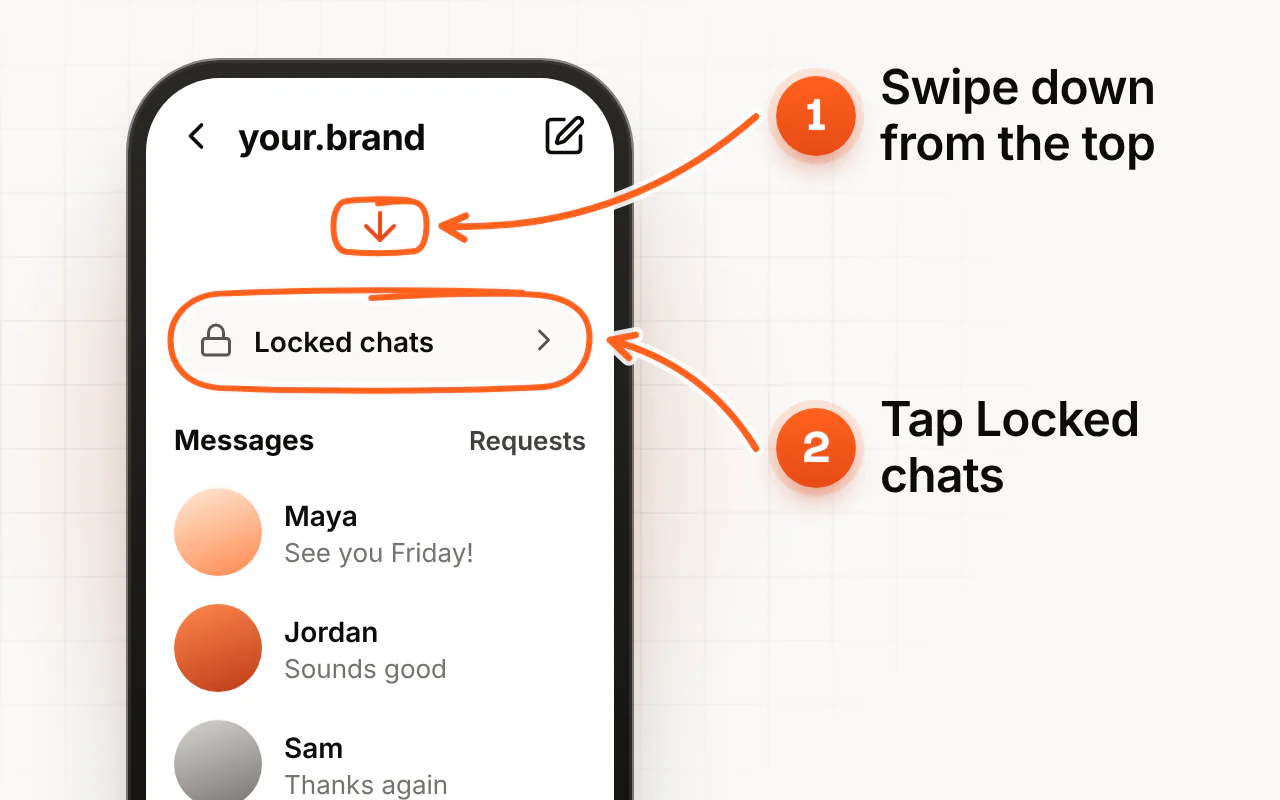
It may be locked. Locked chats move to a hidden folder: swipe down from the top of your inbox, then tap Locked chats.

Inbox pulled down from the top, showing a Locked chats row with a lock icon, circled above the chat list.
Swipe down from the top of your inbox, then tap Locked chats.

Where to tap

iPhone and Android

MessagesSwipe downLocked chats

Why it happens

Swiping left and tapping Hide chat on iPhone, or holding a chat and tapping Lock chat on Android, locks it.

What to do

  1. Open the folder with your face, fingerprint or phone passcode.
  2. To unlock a chat, open it, tap its name, then Privacy & safety, then Lock and hide chat.
  3. Not there either? A deleted chat leaves your inbox only; the other person still has it.
  4. Chat lock isn’t available on computers: look in the app.
Sources (2)Checked

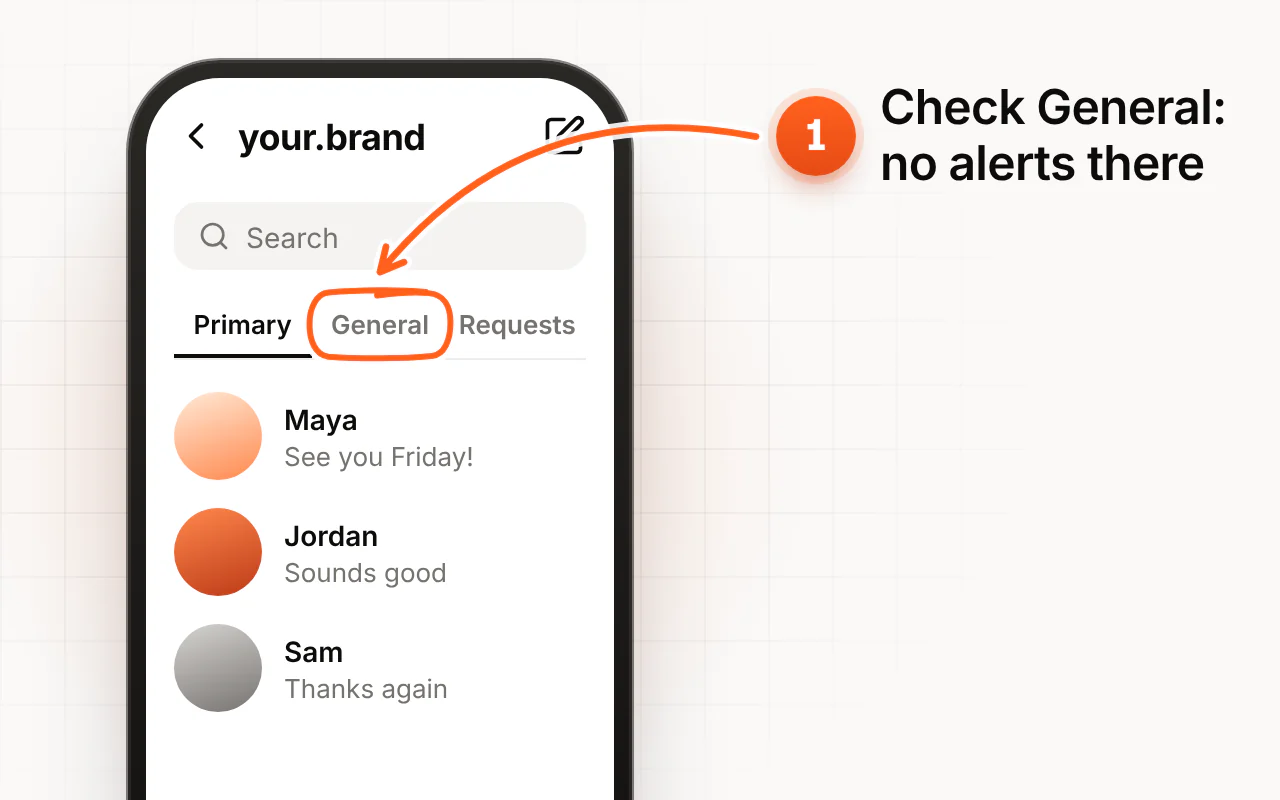
Business account: Primary, General or Requests?

Business and creator accounts get three folders in the mobile app: Primary alerts you, General stays quiet, Requests waits for you.

Business inbox with three folder tabs, Primary, General and Requests, and the General tab circled.
On a business account, check General too: its chats stay quiet unless you turn alerts on.

Where to tap

iPhone and Android

MessagesGeneral

Why it happens

All messages land in Primary, but a chat swiped to General stops sending unread alerts unless you turn them on.

What to do

  1. Swipe a chat to move it between Primary and General.
  2. Working from General? Turn its unread notifications on in your settings.
  3. Reply to or accept a request: that person’s next messages go to Primary.
  4. Brand deals: a Partnership messages folder can appear next to General and Requests.
Sources (2)Checked

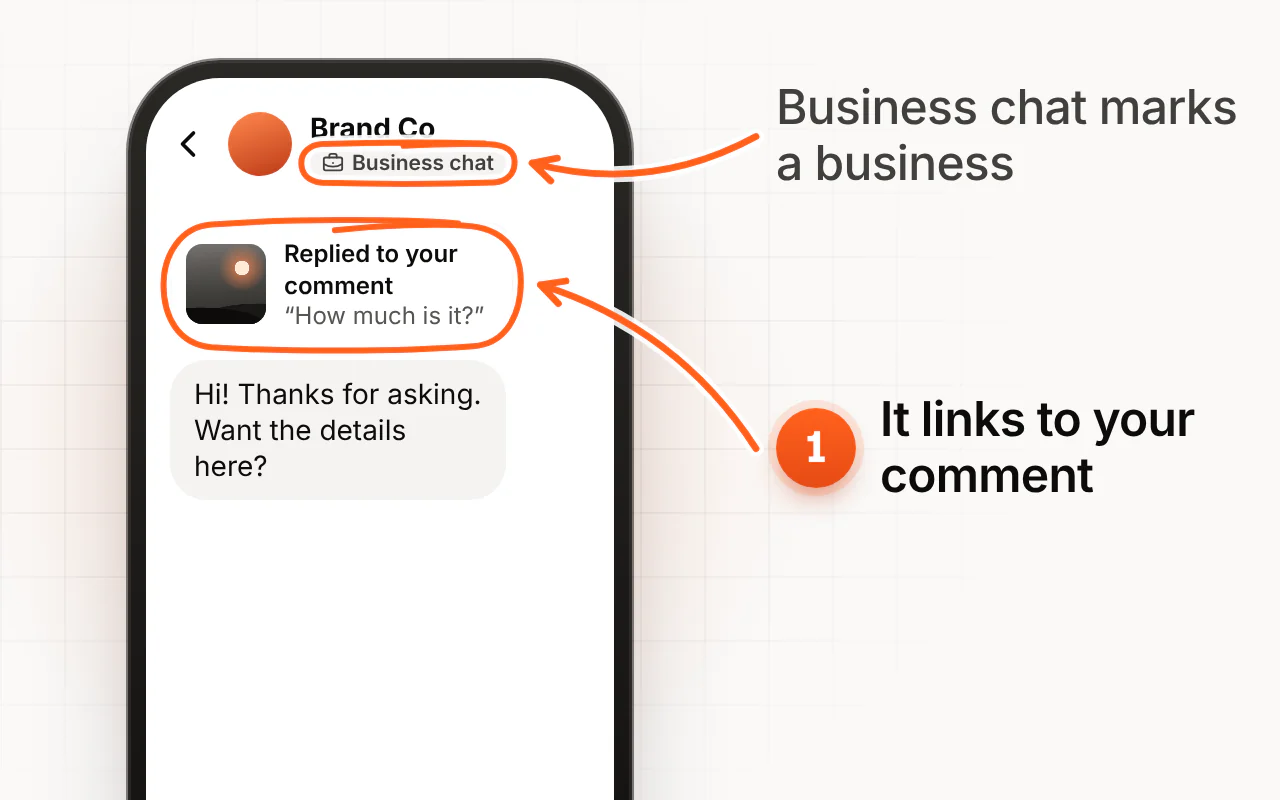
Where’s the DM from a comment or an ad?

A business’s private reply to your comment lands in your chats if you follow the account, or in Requests if you don’t.

Chat from a business labeled Business chat, opening with a card that says Replied to your comment, circled.
A business’s private reply links to the post you commented on.

Where to tap

iPhone and Android

MessagesRequests

Why it happens

Businesses can reply privately to comments on posts, reels, stories, Live or ads. The reply links to the post you commented on.

What to do

  1. Don’t follow the account? Open Requests.
  2. Look for Business chat in the chat’s header: it marks a business account.
  3. Tapped an ad to message a business? That ad takes you straight into a chat with it.
Sources (3)Checked

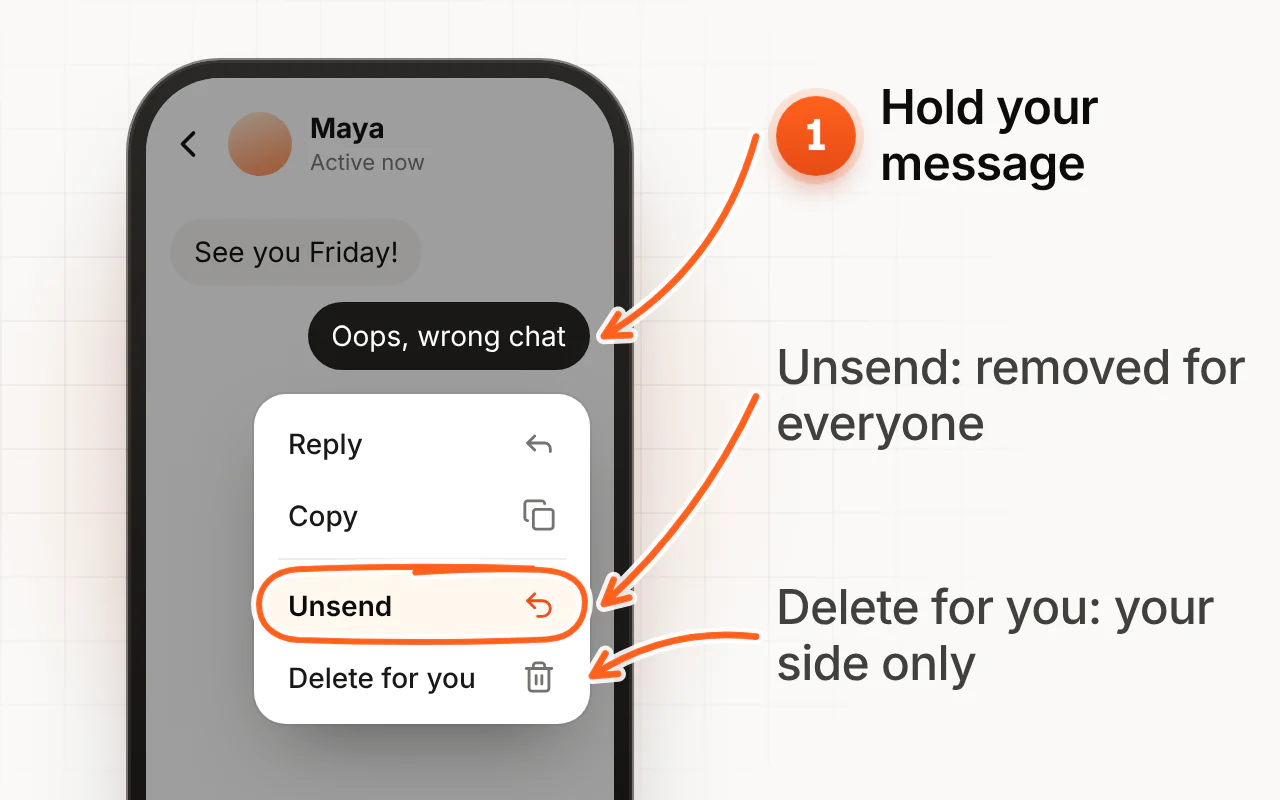
Unsent or deleted a message?

Unsend removes your message for everyone in the chat, though they may have seen it. Delete for you only clears it on your side.

Held message with its menu open: Reply, Copy, Unsend circled, and Delete for you below it.
Hold your message: Unsend removes it for everyone, Delete for you only on your side.

Where to tap

iPhone and Android

MessagesHold the messageUnsend

Computer

MessagesOptionsUnsend

Why it happens

Unsend changes the chat for everyone; Delete for you and deleting a chat only change your own inbox.

What to do

  1. To unsend, open the chat, tap and hold your message, then tap Unsend.
  2. Deleting a chat removes it from your inbox only; the others keep it.
  3. We found no restore option in Instagram Help, and your data download leaves out deleted and unsent messages.
  4. Delete for you isn’t available on computers.
Sources (3)Checked

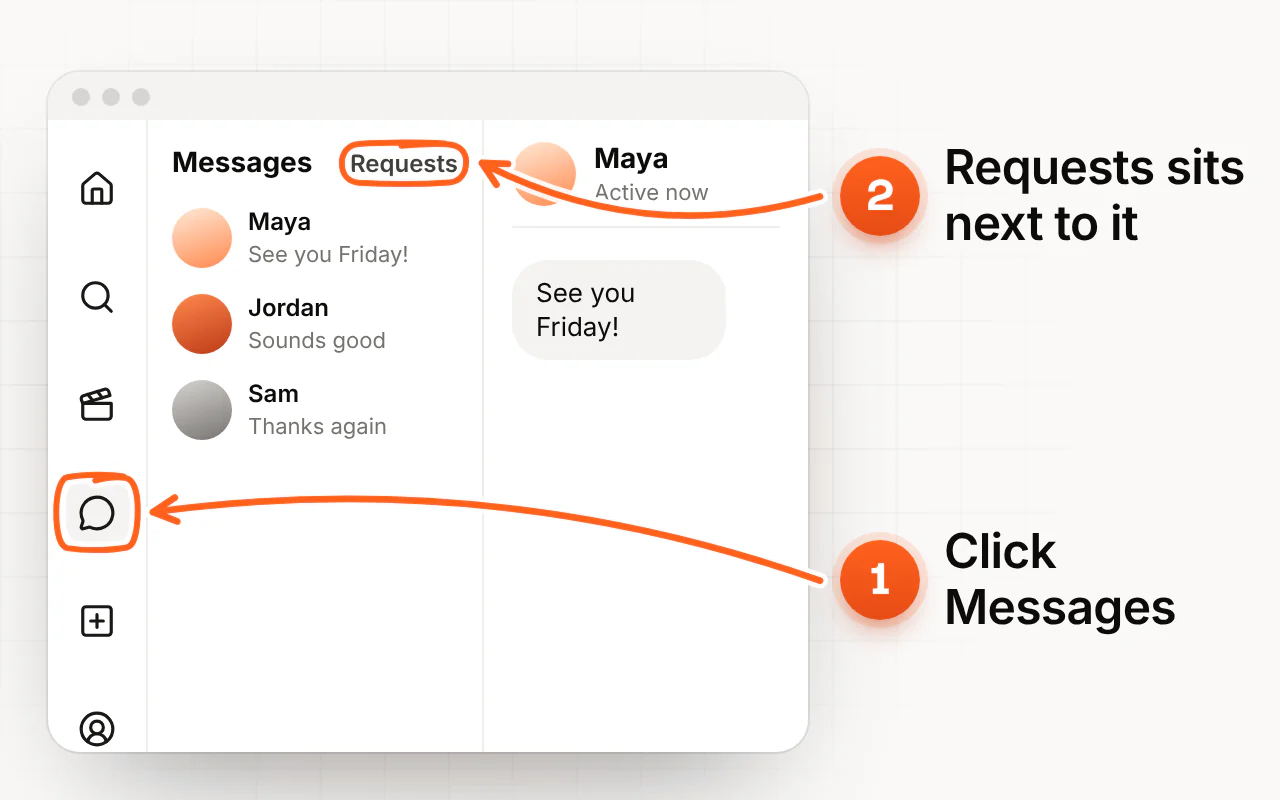
Checking Instagram messages on a computer?

Click Messages on the left. Requests sits next to Messages in the top left, with Spam inside it.

Desktop messaging window with Messages circled in the left icon rail and Requests circled at the top of the chat list.
On a computer, click Messages on the left. Requests sits next to Messages.

Where to tap

Chats

Messages

Requests

MessagesRequestsSpam

Why it happens

Some inbox features are app only: chat lock, Delete for you, the Primary and General folders, and Hidden Words for spam.

What to do

  1. Missing a locked chat or a business folder? Open the app.
  2. Request settings are under More, Settings, Messages and story replies, then Message controls.
  3. To unsend, click Options next to your message, then Unsend.
Sources (7)Checked
For business accounts

Where automated replies show up

Answering through Manychat or another tool? Instagram files those chats differently. Here’s where to look.

Once you’ve found it

Answer every new lead DM

Point ManySetter at new Instagram conversations in Manychat: it replies from your offer, qualifies the lead and books the call.

Jade R.Instagram · From a comment
  1. Lead: Hi! Is the coaching program still open?

  2. AI Setter: It is: $1,500 for 12 weeks. How many clients do you coach now?

  3. Lead: Three, all from referrals.

  4. AI Setter: Then it fits. Want a 20‑minute call this week?

Qualified · booked only when the calendar confirms

Why this reply?

Script step
5. Invitation to the call
It knew
3 clients (fits 2 to 10)
It used
Offer doc: $1,500 for 12 weeks
FAQ

Instagram message questions

Turn the DMs you find into booked calls

Keep your Manychat flows. ManySetter answers new DMs from your offer, qualifies the lead and books the call when they fit.

  • Free to build and test
  • No card to start
  • 14-day trial when you go live