Manychat AI setter: what it is and how to add one
A Manychat AI setter answers the DMs your flows start, qualifies leads and books the call. See how to add one and what it costs.
ManySetter teamUpdated 7 min read
On this page
Chapter 01The basics
What is a Manychat AI setter?
Manychat starts the conversation: a comment, a keyword, a story reply. Then the lead asks something your flow didn’t plan for, like the price or whether the offer fits them.
That’s where a Manychat AI setter takes over. It reads the whole chat, answers from your offer and asks the next qualifying question. When your fit rule is met, it offers times and books the call.

Manychat flow: Here’s the guide: 3 DMs that book calls.
Lead: Thanks! What does the program cost?
AI Setter: $1,500, or 3 × $550. How many clients do you coach?
Lead: Four. I tried a course before, it didn’t stick.
AI Setter: Fair. This one works on your own DMs, week by week.
AI Setter: You’re in the 2–10 range. Want a 20-min fit call?
Qualified · booked only when the calendar confirms
Why this reply?
- Script step
- 5. Invitation to the call
- It knew
- 4 clients (fits 2 to 10)
- It used
- Offer doc: price · Objections doc
Some call it a Manychat AI appointment setter. The job is the same: get the leads who fit onto your calendar.
Chapter 02Compared
What Manychat AI does, and what a setter adds
Manychat has real AI features that answer questions and capture leads. An AI setter for Manychat takes the next part: the sales conversation that should end in a call.
Manychat AI and ManySetter, job by job
Last checked
Is Manychat AI enough? For FAQs, a link to share or details to capture on Instagram, it can be. Add a setter when a call closes the sale.
Every criterion, the price row and the honest limits are in our Manychat AI vs AI setter comparison. Channel by channel: the Instagram DM bot, the Manychat WhatsApp bot and Facebook Messenger automation.
Chapter 03Your options
Three ways to put AI in your Manychat DMs
Built in, built by you, or a setter on top: what each does, takes and costs.

Manychat AI Step
- What it does
- A Flow Builder step that follows the goal, business context and tasks you write. It can save the contact’s reply to a field.
- Setup
- Add it to an automation with a trigger, then publish. Walkthrough: our Manychat AI guide.
- Cost
- On Manychat’s current plans, AI comes with Pro and up. Pro is $39/month, or $29/month billed yearly.
- Best for
- One job inside one flow: answer, capture a detail, route.
- Limits
- Calendar booking isn’t documented.

Your own ChatGPT connection
- What it does
- Your automation sends the message to an AI model you connect, then sends its answer back.
- Setup
- You build the request, the prompt, the data mapping and the fallbacks, then keep them working. Start with our Manychat API guide.
- Cost
- The AI provider’s price per token, on top of Manychat. Estimate it with our LLM cost calculator.
- Best for
- Teams with a developer who want full control of prompts and data.
- Limits
- Lead memory, follow-ups and booking are yours to build.

An AI setter app: ManySetter
- What it does
- Answers from your offer, qualifies on your fit rule, follows up, then books the call or hands off.
- Setup
- Install the app with your ManySetter code and add two actions to your flows. No API key. See the five steps.
- Cost
- $119/month per live setter with 1,500 AI replies, plus a Manychat account. Free to build and test. See the cost.
- Best for
- Selling by call: coaches, consultants and agencies with Manychat flows.
How to choose: answering FAQs on Instagram? Start with Manychat AI. A developer who wants full control? Connect your own model. Selling by call? Add a setter on top.
Chapter 04Step by step
How to add an AI setter to Manychat
What you need: a Manychat account, your offer as text, a link or a PDF, and a calendar or booking link. Each step matches a screen in the app.
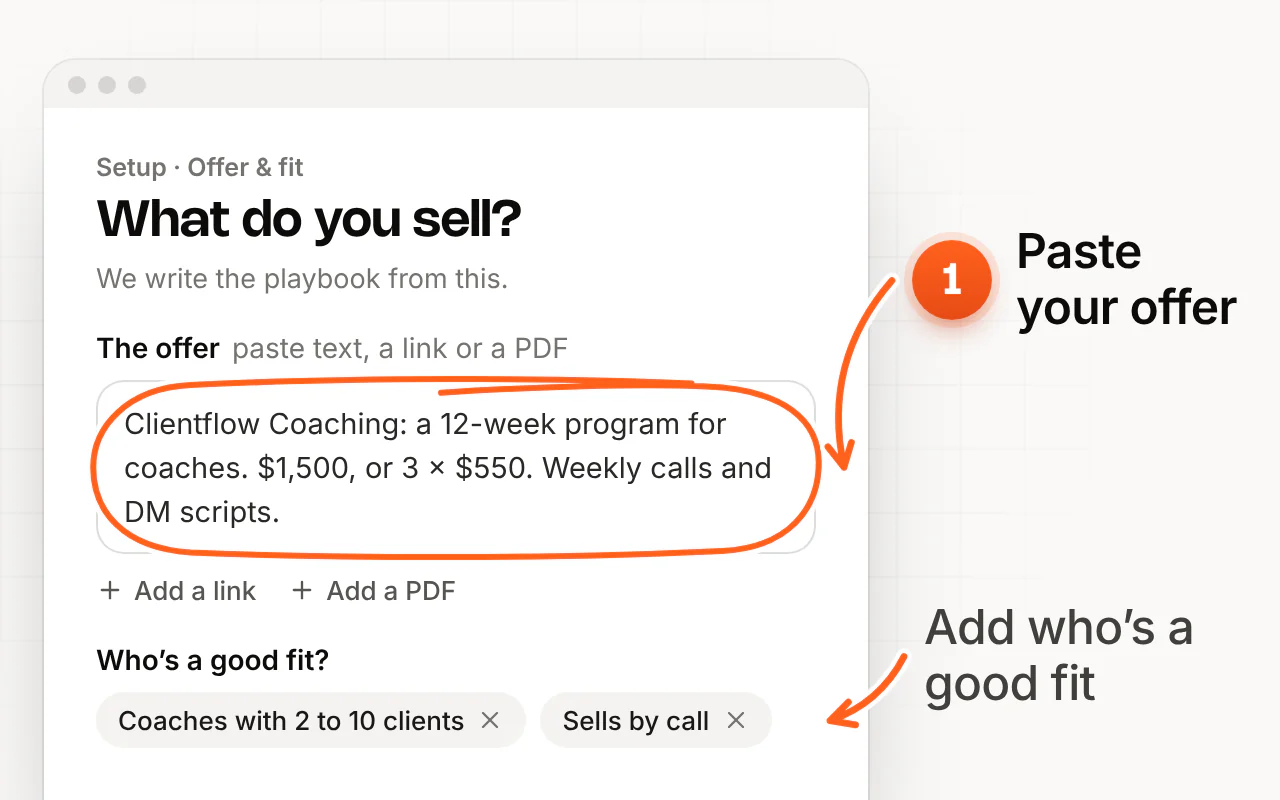
Describe your offer
Where to click: SetupOffer & fit
Paste your offer as text, a link or a PDF, then list who’s a good fit. ManySetter writes your setter’s playbook in about 40 seconds.
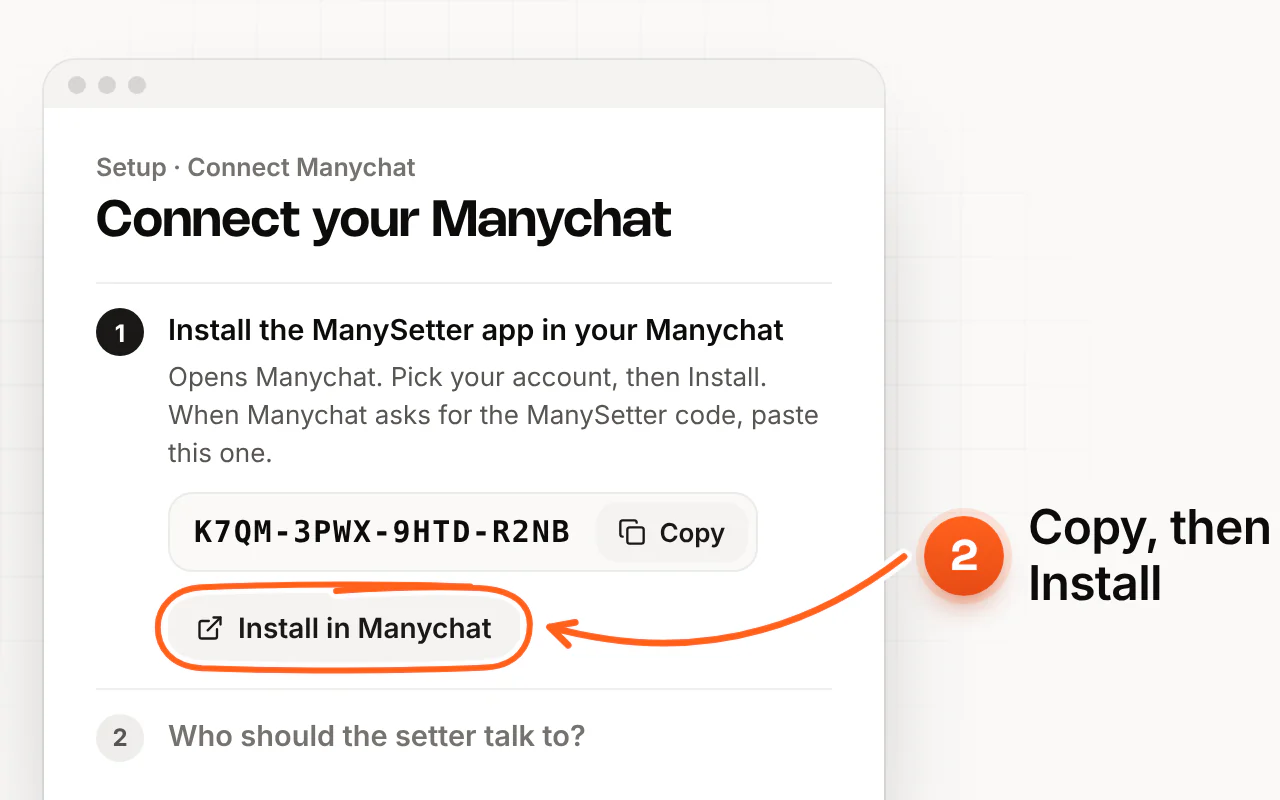
Install the ManySetter app in Manychat
Where to click: Connect ManychatInstall in Manychat
Copy your ManySetter code and click Install in Manychat. Pick your account, click Install, then paste the code when Manychat asks. Use it within an hour. Full install reference, with videos: the ManySetter app in Manychat.
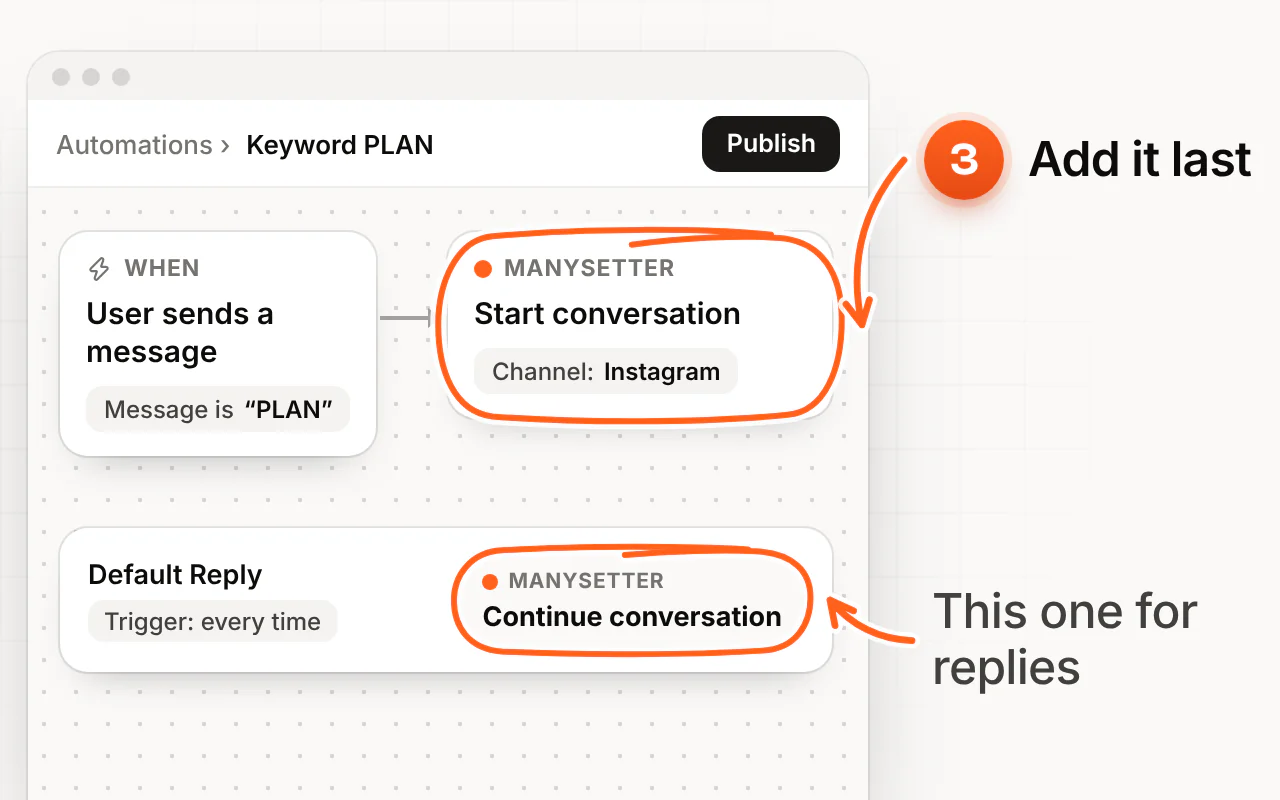
Add the two ManySetter actions
Where to click: Automation+ ActionManySetter
End each automation that brings leads with Start conversation. In each channel’s Default Reply, set every time and keep only Continue conversation. Publish both.
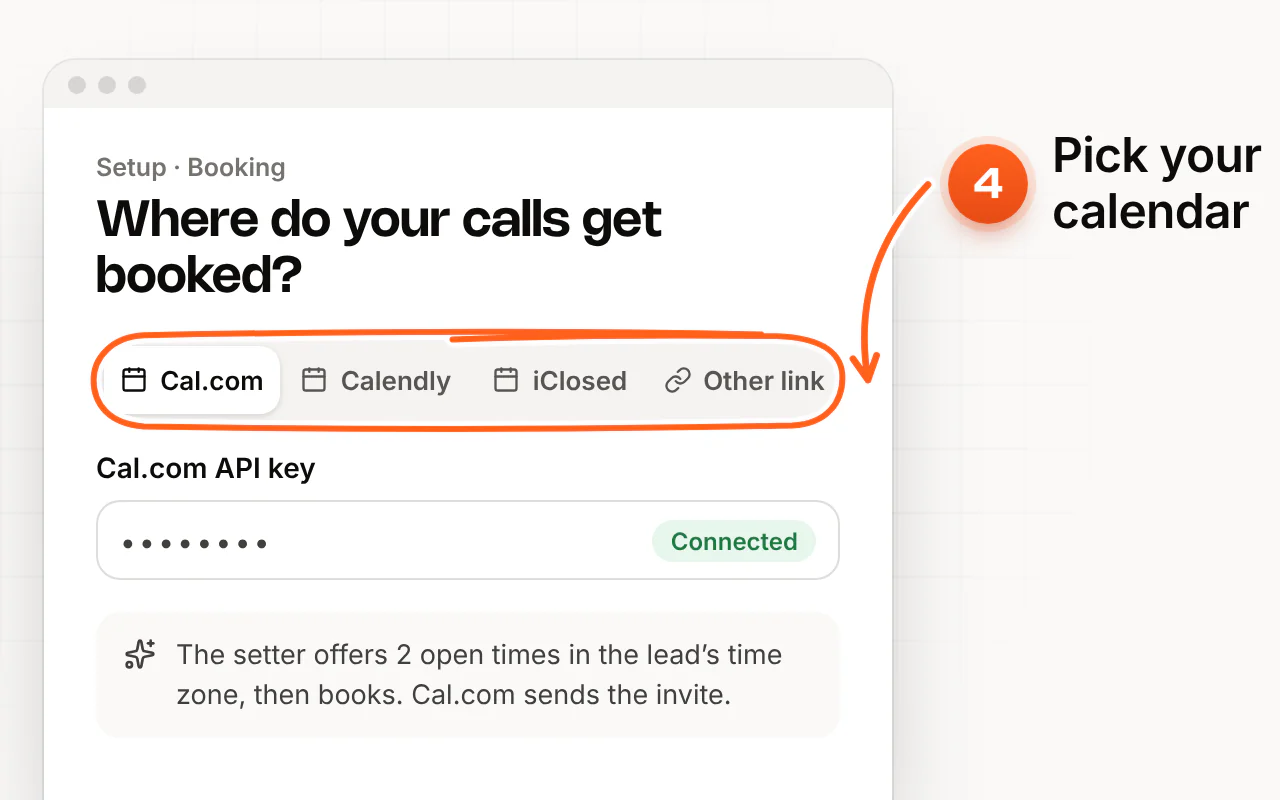
Choose where calls get booked
Where to click: Booking
Connect Cal.com, Calendly or iClosed with one key, then pick the call type. Using another tool? Paste your booking link. On Calendly? See our Manychat Calendly integration guide.
Try it like a lead, then go live
Where to click: Try it & go live
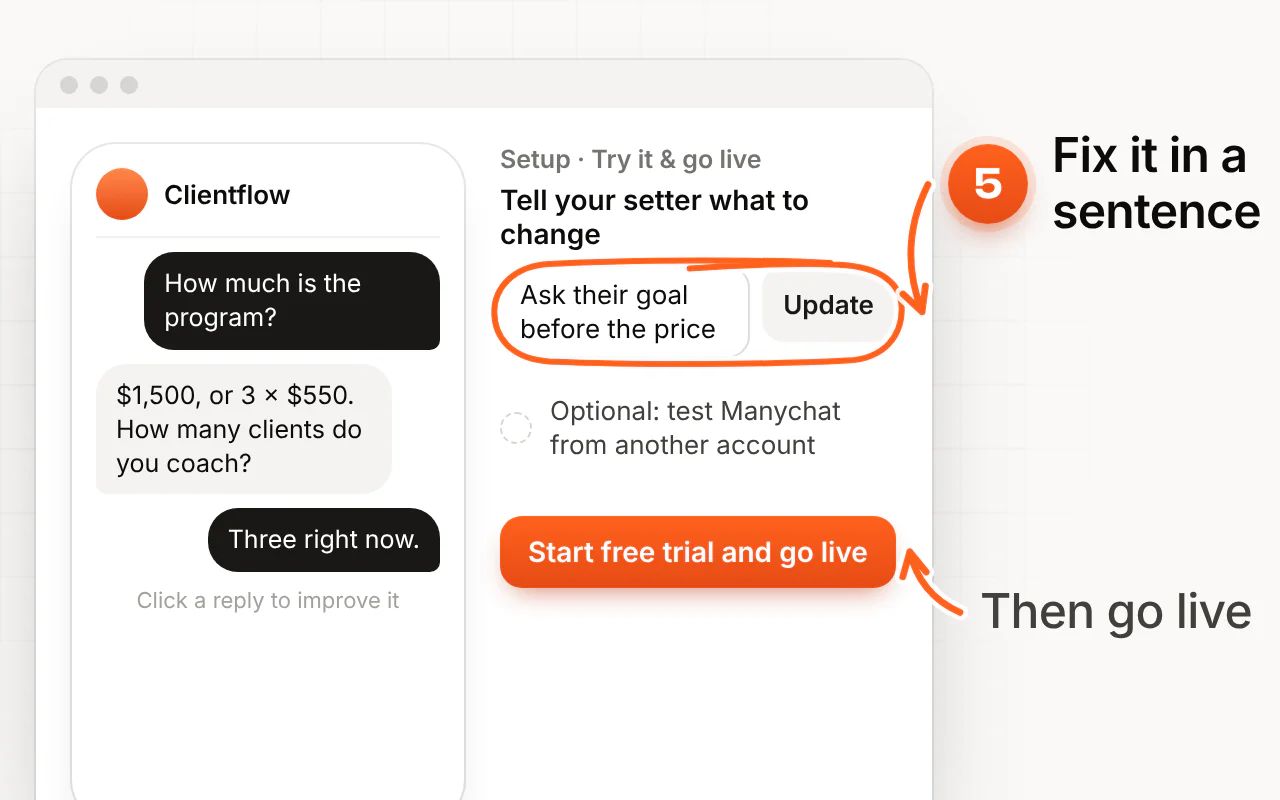
Chat with your setter as a lead would and fix any reply in one sentence. Tests are free. Going live starts your 14-day trial.
Optional: test it in Manychat
Message your account from another one. The Connect Manychat step shows “Manychat test passed” once the setter replies.
Avoid these mistakes
0 of 4 completed
If something doesn’t work
Codes last an hour. Click New code in Connect Manychat, then paste the new one in Manychat.
Click New code and install the app again with it.
Check each channel’s Default Reply: set to every time, with Continue conversation as its only action.
Your other automations keep running. New to triggers? Read our Manychat automation guide.
ManySetter
Your AI setter for Manychat
It answers the DMs your flows start, in your voice, qualifies each lead and books the call.
- Answers from your offer
- Qualifies on your fit rule
- Books calls on your calendar
Build and test free · Works with a Manychat account
Chapter 05Cost
What a Manychat AI setter costs
Two parts: a Manychat account, plus ManySetter for each live setter. Building and testing cost nothing.
Build and test
$0until you go live
- Build and test everything, no card
- Unlimited test chats, never sent to a lead
- Workspaces are free: one per client
ManySetter14 days free
$119/month
Per live setter, or $1,190/year: 2 months free
- 1,500 AI replies a month per live setter
- Up to 3 follow-ups per lead, voice notes in your voice
- 5 team members, clients view results free
- Going live starts a 14-day trial: card required, $0 today
Weighing it against a human setter? Run your numbers in our appointment setter cost calculator.
Chapter 06Method
Where these facts come from
Each Manychat fact on this page comes from one of the Help Center articles below, last reviewed October 26, 2026. ManySetter facts describe the product today.